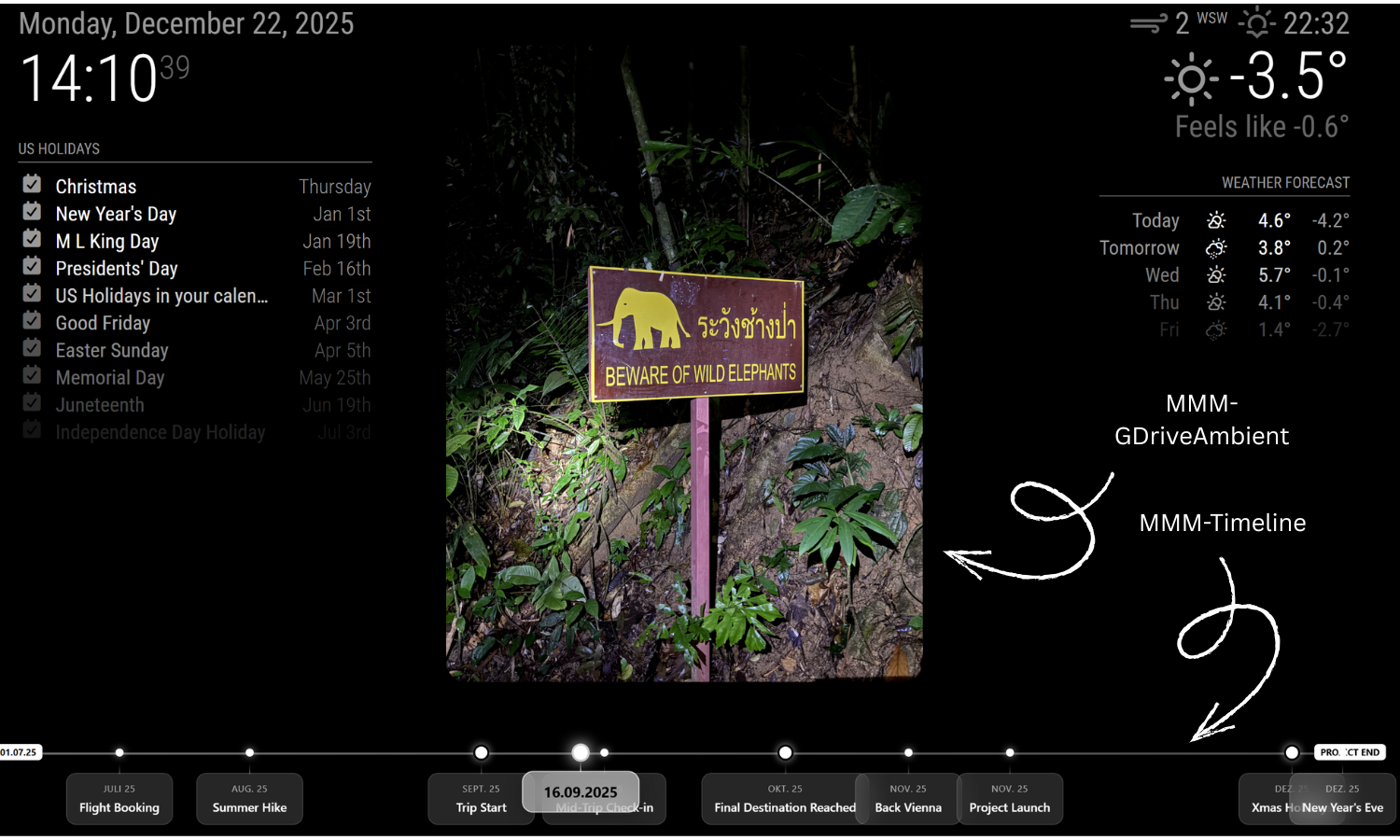
MMM-GDriveAmbient

MMM-GDriveAmbient is a MagicMirror² module that displays random images from a Google Drive folder on your mirror (client-side Module.register) and uses a NodeHelper to authenticate with Google via a Service Account, list files, download a random one, and send it back as a base64 data URL.

It also:

  • extracts an EXIF-like timestamp from Drive file metadata (if present),
  • sends a timeline highlight notification when a photo has a date,
  • converts HEIC/HEIF → JPEG server-side (so the browser can display it),
  • computes a dominant/average color from the image and sets it as a CSS variable --ambient-color.

Architecture overview

This module is split into two parts:

1) Frontend (MagicMirror browser process)

  • Renders the <img> in getDom()
  • Requests a random photo periodically
  • Applies the ambient color via canvas sampling
  • Sends notifications to other modules (Timeline highlight)

2) Backend (NodeHelper in Node.js process)

  • Authenticates to Google Drive with a service account JSON key
  • Lists all images in a given folder (cached)
  • Picks a random file
  • Downloads file bytes
  • Converts HEIC/HEIF to JPEG if needed
  • Sends base64 data URL + optional date metadata to frontend

Features

Random image from a Drive folder

The frontend requests a new random photo at an interval (refreshInterval), the backend selects one from a cached list.

HEIC/HEIF support (server-side conversion)

HEIC is common from iPhones. Many browsers can’t render it reliably. The NodeHelper detects HEIC and runs heic-convert to generate a JPEG buffer.

Date extraction + Timeline highlight

If the file includes imageMediaMetadata.time, the NodeHelper parses it and sends:

  • dateLabel (formatted de-DE)
  • timestamp (milliseconds since epoch)

Frontend then sends:

  • TIMELINE_HIGHLIGHT_DATE with { timestamp, label }
  • or null to clear highlight when there is no date

Ambient color theme

Once the image loads, the frontend samples it via canvas and sets:

  • --ambient-color: rgba(r,g,b,0.9)

Your CSS can use this variable to tint backgrounds, borders, overlays, etc.


Module configuration

Defaults

defaults: {
  folderId: "",
  refreshInterval: 60 * 1000,
  fadeSpeed: 1000,
  debug: false
}

Typical config.js usage

{
  module: "MMM-GDriveAmbient",
  position: "fullscreen_below", // typical for ambient backgrounds
  config: {
    folderId: "YOUR_GOOGLE_DRIVE_FOLDER_ID",
    refreshInterval: 60 * 1000, // 1 minute
    fadeSpeed: 1000,
    debug: false
  }
}

Notes

  • folderId must be the Drive folder ID, not the name.
  • Your service account must have access to that folder (shared with the service account email).

Frontend documentation (Module.register)

Startup lifecycle

When MagicMirror loads the module, start() runs:

start() {
  this.currentPhotoData = null;
  this.currentDateLabel = null;
  this.loaded = false;
  this.timer = null;
  this.requestRandomPhoto();
},

What happens

  • Initializes state
  • Immediately requests the first photo via socket notification

Styling hook

getStyles() {
  return ["MMM-GDriveAmbient.css"];
},

This is where you define visuals like:

  • full-screen positioning
  • transitions
  • using --ambient-color

DOM rendering: loading + image display

getDom() {
  const wrapper = document.createElement("div");
  wrapper.className = "gdrive-ambient-wrapper";

  if (!this.loaded) {
    wrapper.innerHTML = "Verbinde mit Google Drive...";
    return wrapper;
  }

  if (!this.currentPhotoData) {
    return wrapper; 
  }

  const img = document.createElement("img");
  img.className = "gdrive-ambient-image";
  img.src = this.currentPhotoData;

  img.onload = () => {
    this.applyDominantColor(img);
  };

  wrapper.appendChild(img);
  return wrapper;
},

Key points

  • Shows a loading message until first photo arrives
  • Creates an <img> whose src is a base64 data: URL
  • After image loads, calls applyDominantColor(img)

Receiving photo data from NodeHelper

When NodeHelper sends a photo, frontend handles it here:

socketNotificationReceived(notification, payload) {
  if (notification === "GDRIVE_PHOTO_DATA") {
    this.currentPhotoData = payload.data;
    this.currentDateLabel = payload.dateLabel;

    this.loaded = true;
    this.updateDom(this.config.fadeSpeed);

    if (payload.dateLabel && payload.timestamp) {
      this.sendNotification("TIMELINE_HIGHLIGHT_DATE", {
        timestamp: payload.timestamp,
        label: payload.dateLabel
      });
    } else {
      this.sendNotification("TIMELINE_HIGHLIGHT_DATE", null);
    }

    this.scheduleNextPhoto();
  }

  if (notification === "GDRIVE_ERROR") {
    Log.error("MMM-GDriveAmbient Error: " + payload);
  }
},

Behavior

  • Stores the base64 image in this.currentPhotoData
  • Triggers updateDom(fadeSpeed) to animate swap
  • Sends timeline highlight (or clears it)
  • Starts/refreshes the interval loop

Requesting a random photo

requestRandomPhoto() {
  this.sendSocketNotification("GDRIVE_REQUEST_RANDOM_PHOTO", {
    folderId: this.config.folderId
  });
},

This is the frontend → backend command to fetch a new random image.


Scheduling refresh

scheduleNextPhoto() {
  if (this.timer) clearInterval(this.timer);
  this.timer = setInterval(() => {
    this.requestRandomPhoto();
  }, this.config.refreshInterval);
},

Why clearInterval first? Each received photo resets the loop so you don’t accumulate multiple timers.


Ambient color sampling (dominant/average color)

applyDominantColor(img) {
  try {
    const canvas = document.createElement("canvas");
    const ctx = canvas.getContext("2d");
    const sampleSize = 50;
    canvas.width = sampleSize;
    canvas.height = sampleSize;

    ctx.drawImage(img, 0, 0, sampleSize, sampleSize);
    const data = ctx.getImageData(0, 0, sampleSize, sampleSize).data;

    let r = 0, g = 0, b = 0, c = 0;

    for (let i = 0; i < data.length; i += 40) {
      r += data[i];
      g += data[i + 1];
      b += data[i + 2];
      c++;
    }

    if (c > 0) {
      const col = `rgba(${Math.round(r/c)}, ${Math.round(g/c)}, ${Math.round(b/c)}, 0.9)`;
      const w = this.dom || document.querySelector(`#${this.identifier}`);
      if (w) w.style.setProperty("--ambient-color", col);
    }
  } catch (e) {}
}

How it works

  • Downscales the image to 50×50 for cheap sampling
  • Averages pixel channels using a stride (i += 40) to reduce work further
  • Sets CSS custom property --ambient-color

CSS usage example

.gdrive-ambient-wrapper {
  background: var(--ambient-color, rgba(0,0,0,0.8));
}

Backend documentation (NodeHelper)

This part runs in Node.js and must live in your module folder as node_helper.js.

Imports

const NodeHelper = require("node_helper");
const { google } = require("googleapis");
const path = require("path");
const heicConvert = require("heic-convert");

Purpose

  • googleapis: Drive API client
  • heic-convert: Convert HEIC/HEIF → JPEG
  • node_helper: MagicMirror backend bridge

NodeHelper startup + caching

start() {
  console.log("Starting node_helper for MMM-GDriveAmbient");
  this.files = [];
  this.lastListUpdate = 0;
  this.cacheTime = 5 * 60 * 1000;
},

Caching

  • this.files holds the last file listing
  • Re-lists at most every cacheTime (5 minutes)

Handling socket request from frontend

socketNotificationReceived(notification, payload) {
  if (notification === "GDRIVE_REQUEST_RANDOM_PHOTO") {
    this.serveRandomPhoto(payload.folderId);
  }
},

Creating a Google Drive client (Service Account)

getDriveClient() {
  const auth = new google.auth.GoogleAuth({
    keyFile: path.join(__dirname, "service-account.json"),
    scopes: ["https://www.googleapis.com/auth/drive.readonly"]
  });
  return google.drive({ version: "v3", auth });
},

Important

  • service-account.json must exist in the module folder.
  • Scope is readonly: drive.readonly

Selecting a random file and extracting date metadata

async serveRandomPhoto(folderId) {
  try {
    const now = Date.now();
    if (!this.files.length || (now - this.lastListUpdate > this.cacheTime)) {
      await this.refreshFileList(folderId);
    }

    if (!this.files.length) {
      this.sendSocketNotification("GDRIVE_ERROR", "Keine Bilder gefunden.");
      return;
    }

    const randomFile = this.files[Math.floor(Math.random() * this.files.length)];

    let dateLabel = null;
    let timestamp = null;

    if (randomFile.imageMediaMetadata && randomFile.imageMediaMetadata.time) {
      const dateObj = this.parseDate(randomFile.imageMediaMetadata.time);

      if (!isNaN(dateObj.getTime())) {
        timestamp = dateObj.getTime();
        dateLabel = dateObj.toLocaleDateString("de-DE", {
          day: "2-digit", month: "2-digit", year: "numeric"
        });
      }
    }

    await this.downloadAndSendPhoto(randomFile.id, dateLabel, timestamp, randomFile.name);

  } catch (err) {
    console.error("MMM-GDriveAmbient ERROR:", err);
  }
},

Key points

  • Refreshes file list if cache expired
  • Extracts date from imageMediaMetadata.time when available
  • Passes randomFile.name so HEIC detection can use extension fallback

Listing all images in the Drive folder

async refreshFileList(folderId) {
  const drive = this.getDriveClient();
  try {
    const res = await drive.files.list({
      q: `'${folderId}' in parents and mimeType contains 'image/' and trashed = false`,
      fields: "files(id, name, mimeType, createdTime, imageMediaMetadata)",
      pageSize: 1000
    });

    this.files = res.data.files || [];
    this.lastListUpdate = Date.now();
    console.log(`MMM-GDriveAmbient: ${this.files.length} Bilder gefunden.`);
  } catch (err) {
    console.error("Fehler beim Laden der Dateiliste:", err);
  }
},

Drive query explanation

  • '${folderId}' in parents → only files inside the folder
  • mimeType contains 'image/' → includes most image types
  • trashed = false → excludes deleted items

Downloading the file + HEIC conversion + sending to frontend

async downloadAndSendPhoto(fileId, dateLabel, timestamp, filename) {
  try {
    const drive = this.getDriveClient();
    const response = await drive.files.get(
      { fileId: fileId, alt: "media" },
      { responseType: "arraybuffer" }
    );

    let buffer = Buffer.from(response.data);
    let mimeType = response.headers["content-type"] || "image/jpeg";

    const isHeic = (
      (mimeType && (mimeType.includes("heic") || mimeType.includes("heif"))) ||
      (filename && filename.toLowerCase().endsWith(".heic"))
    );

    if (isHeic) {
      try {
        console.log(`MMM-GDriveAmbient: Konvertiere HEIC (${filename}) zu JPEG...`);
        const outputBuffer = await heicConvert({
          buffer: buffer,
          format: "JPEG",
          quality: 0.8
        });

        buffer = outputBuffer;
        mimeType = "image/jpeg";
      } catch (convErr) {
        console.error("Fehler bei der HEIC Konvertierung:", convErr);
      }
    }

    const base64 = buffer.toString("base64");
    const dataUrl = `data:${mimeType};base64,${base64}`;

    this.sendSocketNotification("GDRIVE_PHOTO_DATA", {
      id: fileId,
      data: dataUrl,
      dateLabel: dateLabel,
      timestamp: timestamp
    });
  } catch (err) {
    console.error("Download Error:", err);
  }
},

Why data: URL?

  • Frontend can immediately render without saving a file.
  • Works well for MagicMirror, but note memory usage for very large photos.

HEIC detection

  • Checks content-type header OR filename extension .heic
  • Converts to JPEG at quality 0.8

Date parsing helper

parseDate(dateStr) {
  if (!dateStr) return new Date();
  if (dateStr.includes(" ") && dateStr.includes(":")) {
    const parts = dateStr.split(" ");
    const datePart = parts[0].replace(/:/g, "-");
    const timePart = parts[1];
    return new Date(`${datePart}T${timePart}`);
  }
  return new Date(dateStr);
}

This accounts for metadata formats that sometimes use YYYY:MM:DD HH:MM:SS.


Notifications

Frontend → Backend

  • GDRIVE_REQUEST_RANDOM_PHOTO
    • payload: { folderId }

Backend → Frontend

  • GDRIVE_PHOTO_DATA
    • payload: { id, data, dateLabel, timestamp }
  • GDRIVE_ERROR
    • payload: "message"

Frontend → Other modules

  • TIMELINE_HIGHLIGHT_DATE
    • payload: { timestamp, label } or null

Installation & setup

1) Place module folder

MagicMirror/modules/MMM-GDriveAmbient/
  ├─ MMM-GDriveAmbient.js
  ├─ node_helper.js
  ├─ MMM-GDriveAmbient.css
  └─ service-account.json

2) Install dependencies

From the module folder:

npm install googleapis heic-convert

3) Google Drive service account access

  1. Create a Google Cloud project
  2. Enable Google Drive API
  3. Create a Service Account
  4. Download key JSON → save as service-account.json in module folder
  5. Share your target Drive folder with the service account email (Viewer access)

Performance & reliability notes

Image size

If your Drive images are huge (phone photos), base64 data URLs can be heavy. Consider:

  • using Drive API thumbnails (different endpoint / fields),
  • or resizing server-side before sending.

Cache behavior

The file list is cached for 5 minutes. That reduces Drive API calls significantly.

HEIC conversion cost

HEIC conversion is CPU-heavy. If you have many HEIC photos and a short refresh interval, consider:

  • increasing refreshInterval,
  • pre-converting your library,
  • or caching converted results.

Example CSS ideas

Use the ambient color variable:

.gdrive-ambient-wrapper {
  position: relative;
  width: 100%;
  height: 100%;
  background: var(--ambient-color, rgba(0,0,0,0.85));
  transition: background 800ms ease;
}

.gdrive-ambient-image {
  width: 100%;
  height: 100%;
  object-fit: cover;
  filter: saturate(1.05) contrast(1.05);
}

Troubleshooting

“Keine Bilder gefunden.”

  • Wrong folderId
  • Folder not shared with service account email
  • Folder contains no items with mimeType matching image/

Auth errors / permission denied

  • service-account.json missing or invalid
  • Drive API not enabled
  • Folder not shared with the service account

HEIC still not showing

  • heic-convert not installed (missing dependency)
  • Conversion fails (check NodeHelper logs)
  • Some HEIF variants can be tricky; consider converting offline

Source code reference

This documentation reflects the code structure as provided:

  • Frontend Module.register("MMM-GDriveAmbient", ...)
  • Backend node_helper.js with Drive + HEIC conversion + metadata