Edge AI Radar — TinyML on a 60 GHz radar at the edge
An object-classifying radar that runs on a five-dollar MCU — TinyML, MicroPython, and a live Next.js dashboard, end to end.
Project Overview



The Edge AI Inventory System was developed for the MicroPython & Edge AI Hands-On Course at TU Wien, demonstrating how machine learning can be brought directly to the edge.
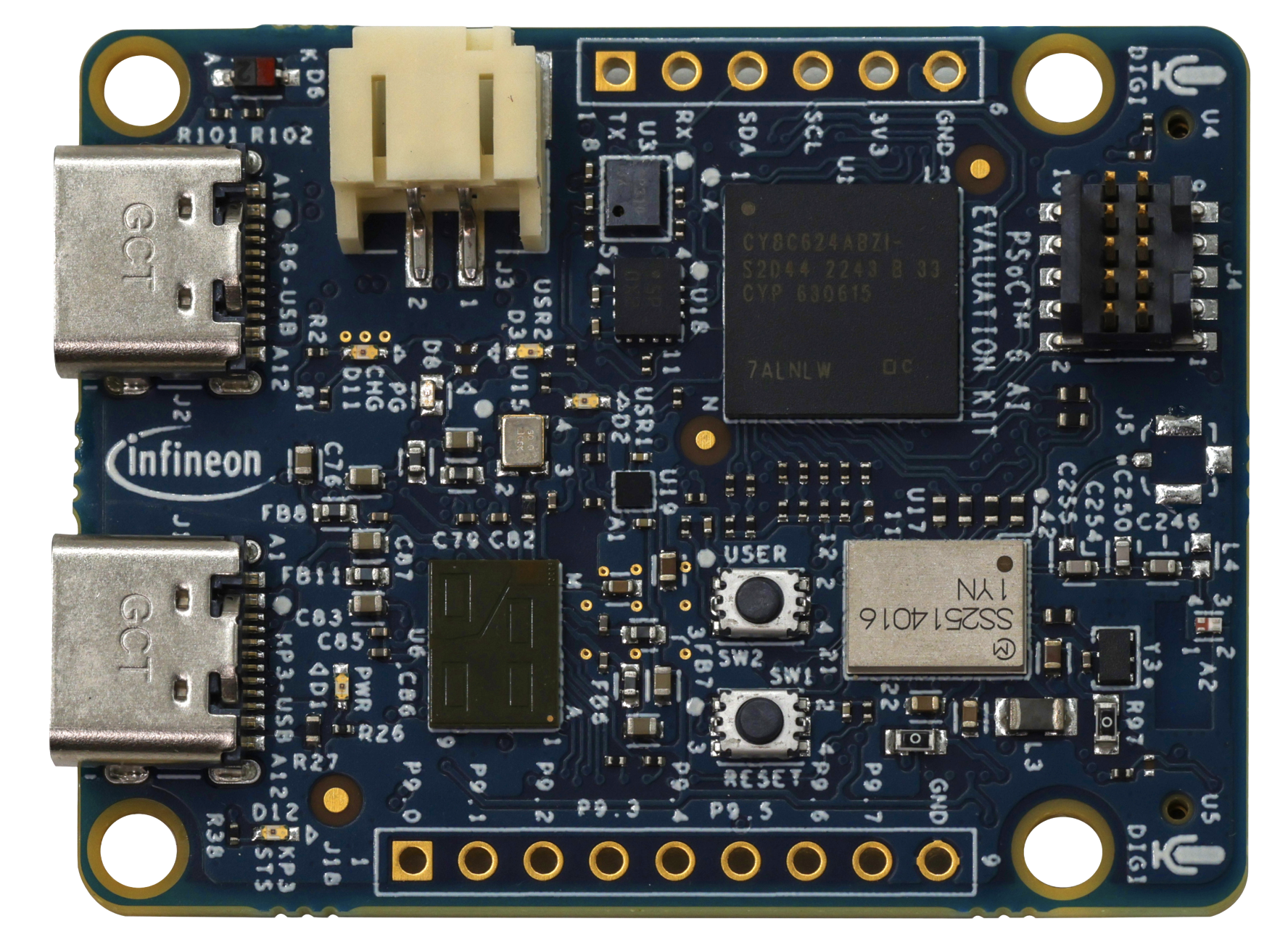
The system uses an Infineon CY8CKIT-062S2-AI board equipped with a 60 GHz radar sensor (BGT60TR13C) and a 6-axis IMU (BMI270) to classify objects in real time — entirely on-device. Detection events are transmitted over Wi-Fi to a cloud-connected backend and visualized on a modern live dashboard.
The core idea: collect sensor data → train a TinyML model with DEEPCRAFT™ → deploy it on MicroPython → report results to a web dashboard — an end-to-end Edge AI pipeline.
Hardware
The project is built around the Infineon CY8CKIT-062S2-AI evaluation board, a sensor-rich platform designed for Edge AI applications.
On-Board Sensors & Connectivity:
| Peripheral | Component | Purpose |
|---|---|---|
| 60 GHz Radar | BGT60TR13C | Presence & motion detection |
| IMU | BMI270 | 6-axis motion & vibration analysis |
| Barometric Pressure | DPS368 | Environmental monitoring |
| MEMS Microphone | IM69D130 | Audio capture |
| Wi-Fi + Bluetooth | CYW43439 | Wireless connectivity |
Software Stack
The system spans from embedded firmware to a reactive web frontend, connected through a RESTful API.
| Layer | Technology | Role |
|---|---|---|
| Edge Firmware | MicroPython | Rapid prototyping on the PSoC6 MCU |
| Machine Learning | Imagimob DEEPCRAFT™ | Training & deploying TinyML models |
| Backend | Flask (Python) | RESTful API for device & inventory management |
| Frontend | Next.js (React) | Interactive real-time dashboard |
| Device Tooling | mpremote / Thonny IDE | Flashing, debugging, serial communication |
Architecture Flow
PSoC6 Board (MicroPython + TinyML Model)
    │
    │ Wi-Fi HTTP POST
    ▼
Flask Backend (REST API + SQLite)
    │
    │ API calls
    ▼
Next.js Dashboard (Real-time visualization)
Data Pipeline & Signal Processing
Building a reliable TinyML model required extensive data collection and signal processing work:
- 400+ minutes of raw sensor data were recorded across multiple sessions, covering various object types, distances, and environmental conditions.
- FFT (Fast Fourier Transform) analysis was applied to radar and IMU signals to extract frequency-domain features critical for object classification.
- Digital filtering and preprocessing pipelines were implemented to remove noise, normalize sensor readings, and segment continuous data streams into labeled training windows.
This rigorous data engineering effort was essential to achieving high model accuracy on the resource-constrained PSoC6 platform.
Results
Live Dashboard
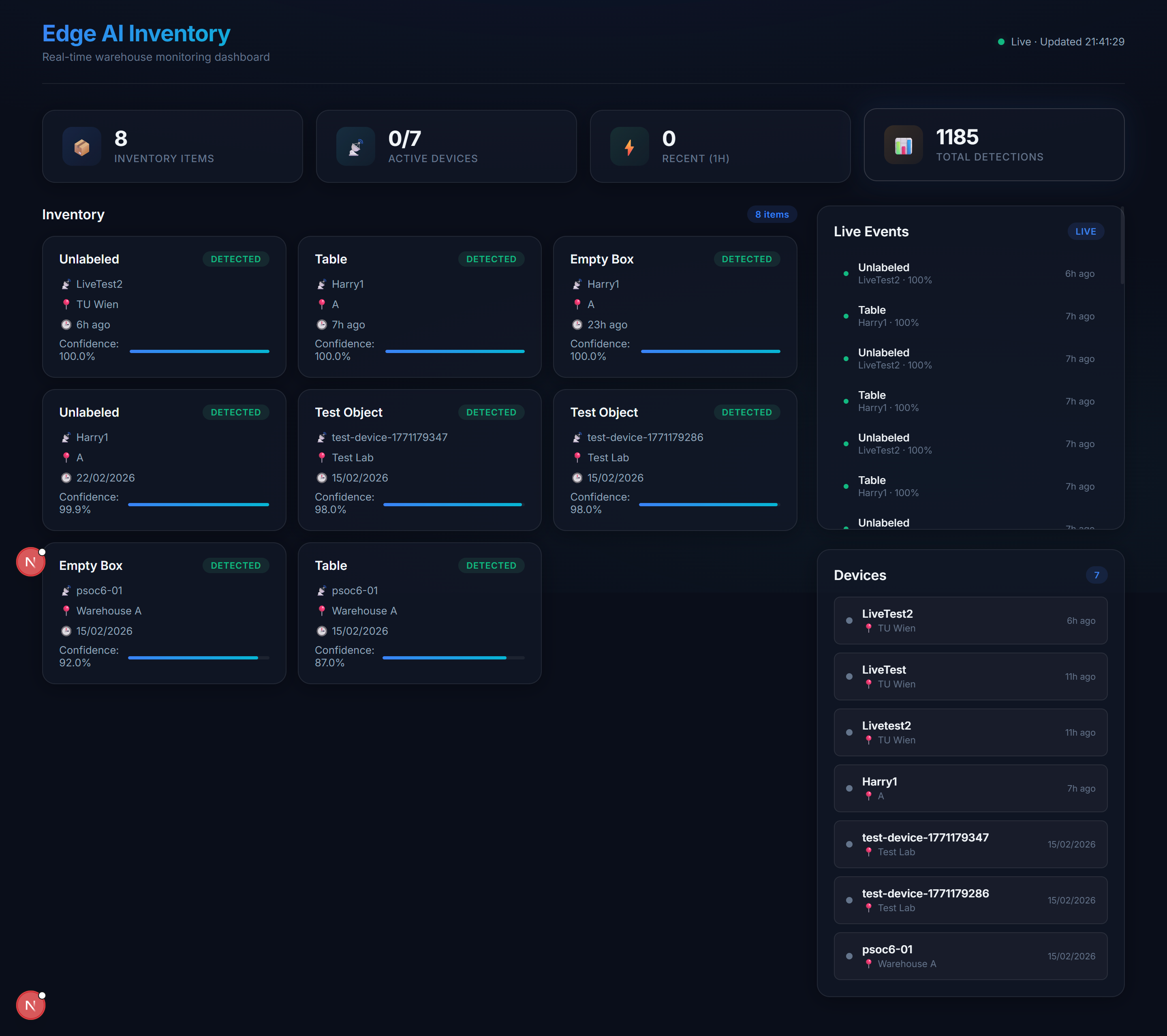
The Next.js dashboard provides real-time inventory tracking and device management. It displays detection events, device status, and historical data — all updated live from the PSoC6 via the Flask backend.
Model Training — Confusion Matrices
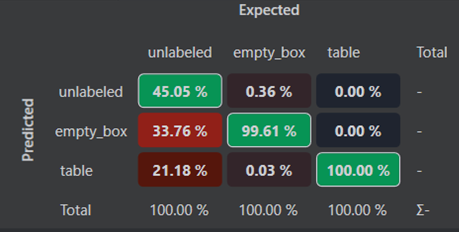
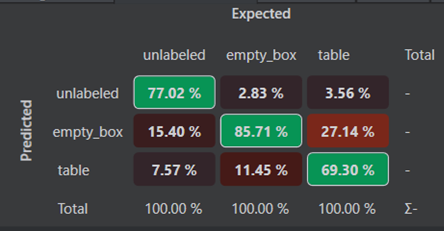
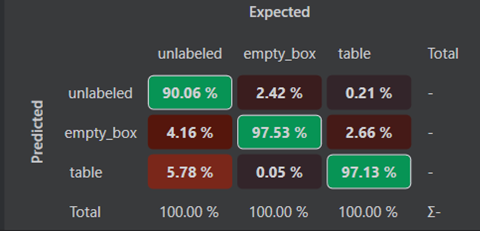
The TinyML model was trained iteratively using Imagimob DEEPCRAFT™ Studio with radar and IMU sensor data. Each round improved classification accuracy by refining the dataset and signal processing pipeline.
Iteration 1 — Initial Model: The first training run used a limited dataset as a proof of concept. The confusion matrix shows the baseline classification performance with noticeable misclassifications between similar object categories.
Iteration 2 — Expanded Dataset: After collecting significantly more sensor data and refining the FFT-based feature extraction, the model showed a clear improvement in distinguishing between object classes.
Iteration 3 — Final Model: With the full 400+ minutes of curated training data and optimized preprocessing, the final model achieves high classification accuracy and is deployed directly on the PSoC6 as a MicroPython-compatible binary — enabling low-latency, on-device inference without any cloud dependency.
Key Features
- Real-time Object Classification — TinyML inference on the PSoC6 using radar and IMU data
- Edge-to-Cloud Connectivity — Wi-Fi-enabled event reporting to a Flask REST API
- Live Dashboard — Next.js frontend for real-time inventory tracking and device management
- Automated Deployment — A single Python script handles server startup, device registration, configuration, and flashing
- Low Latency — Local inference ensures immediate response to detection events
How to Reproduce
The project is designed for easy reproduction using an automated setup script.
Prerequisites: Python 3.10+, Node.js 18+, mpremote (pip install mpremote), and a PSoC6 device connected via USB with the MicroPython interpreter flashed.
# 1. Clone the repository
git clone https://github.com/CuzImHarry/micropython-hands-on-course.git
cd micropython-hands-on-course/project

# 2. Run the automated setup
python full_setup.py
The script will prompt for your Wi-Fi credentials and a device name, then automatically:
- Start the Flask backend and Next.js frontend
- Register the device with the server
- Generate a
config.pywith your unique API key - Flash all MicroPython files and libraries to the PSoC6
Once complete, open http://localhost:3000 to access the live dashboard.
A detailed manual reproduction guide is available in the repository under
project/REPRODUCTION_GUIDE.md.
Source Code
Full documentation, reproduction guide, and source code available on GitHub: github.com/CuzImHarry/micropython-hands-on-course